前のチュートリアル: 輪郭の特性
次のチュートリアル: 輪郭の階層構造
目的
この章では、次のことを学ぶ
- 凸性欠陥 (convexity defects) と、その求め方。
- 点から多角形までの最短距離を求める
- 異なる形状のマッチング
理論とコード
1. 凸性欠陥
輪郭に関する2番目の章で凸包 (convex hull) とは何かを見た。この凸包からの物体のずれは、いずれも凸性欠陥とみなすことができる。
OpenCVにはこれを求めるための既製の関数 cv.convexityDefects() が用意されている。基本的な関数呼び出しは以下のようになる:
void convexHull(InputArray points, OutputArray hull, bool clockwise=false, bool returnPoints=true)
Finds the convex hull of a point set.
void convexityDefects(InputArray contour, InputArray convexhull, OutputArray convexityDefects)
Finds the convexity defects of a contour.
- 覚え書き
- 凸性欠陥を求めるには、凸包を求める際に returnPoints = False を渡す必要があることを忘れないように。
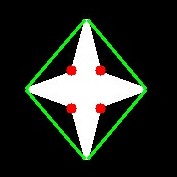
各行がこれらの値を含む配列を返す - [ 始点, 終点, 最遠点, 最遠点までの近似距離 ]。これを画像を使って可視化できる。始点と終点を結ぶ線を描き、最遠点に円を描く。返される最初の3つの値は cnt のインデックスであることを忘れないように。したがって、それらの値を cnt から取得する必要がある。
import cv2 as cv
import numpy as np
assert img is not None, "file could not be read, check with os.path.exists()"
cnt = contours[0]
for i in range(defects.shape[0]):
s,e,f,d = defects[i,0]
start = tuple(cnt[s][0])
end = tuple(cnt[e][0])
far = tuple(cnt[f][0])
void imshow(const String &winname, InputArray mat)
Displays an image in the specified window.
int waitKey(int delay=0)
Waits for a pressed key.
void destroyAllWindows()
Destroys all of the HighGUI windows.
Mat imread(const String &filename, int flags=IMREAD_COLOR_BGR)
Loads an image from a file.
void cvtColor(InputArray src, OutputArray dst, int code, int dstCn=0, AlgorithmHint hint=cv::ALGO_HINT_DEFAULT)
Converts an image from one color space to another.
void line(InputOutputArray img, Point pt1, Point pt2, const Scalar &color, int thickness=1, int lineType=LINE_8, int shift=0)
Draws a line segment connecting two points.
void circle(InputOutputArray img, Point center, int radius, const Scalar &color, int thickness=1, int lineType=LINE_8, int shift=0)
Draws a circle.
double threshold(InputArray src, OutputArray dst, double thresh, double maxval, int type)
Applies a fixed-level threshold to each array element.
void findContours(InputArray image, OutputArrayOfArrays contours, OutputArray hierarchy, int mode, int method, Point offset=Point())
Finds contours in a binary image.
そして結果を見てみる:
image
2. 点と多角形のテスト
この関数は、画像内の点と輪郭の間の最短距離を求める。点が輪郭の外側にあるときは負、内側にあるときは正、輪郭上にあるときは0となる距離を返す。
例えば、点 (50,50) を次のように調べることができる:
double pointPolygonTest(InputArray contour, Point2f pt, bool measureDist)
Performs a point-in-contour test.
この関数の3番目の引数は measureDist である。True の場合は符号付き距離を求める。False の場合は、点が輪郭の内側・外側・輪郭上のいずれにあるかを求める(それぞれ +1, -1, 0 を返す)。
- 覚え書き
- 距離を求める必要がない場合は、3番目の引数を必ず False にすること。これは時間のかかる処理であるため、False にすると約2~3倍の高速化が得られる。
3. 形状のマッチング
OpenCVには、2つの形状や2つの輪郭を比較し、その類似度を示す指標を返す関数 cv.matchShapes() がある。結果が小さいほど、よく一致していることを表す。これはHuモーメントの値に基づいて計算される。さまざまな測定方法はドキュメントで説明されている。
import cv2 as cv
import numpy as np
img1 =
cv.imread(
'star.jpg', cv.IMREAD_GRAYSCALE)
img2 =
cv.imread(
'star2.jpg', cv.IMREAD_GRAYSCALE)
assert img1 is not None, "file could not be read, check with os.path.exists()"
assert img2 is not None, "file could not be read, check with os.path.exists()"
cnt1 = contours[0]
cnt2 = contours[0]
print( ret )
double matchShapes(InputArray contour1, InputArray contour2, int method, double parameter)
Compares two shapes.
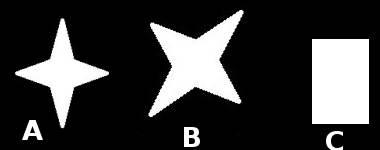
以下に示すさまざまな形状で形状マッチングを試してみた:
image
次の結果が得られた:
- 画像 A 同士のマッチング = 0.0
- 画像 A と画像 B のマッチング = 0.001946
- 画像 A と画像 C のマッチング = 0.326911
ご覧のとおり、画像の回転もこの比較にはあまり影響しない。
- 覚え書き
- Huモーメントは、平行移動・回転・スケールに対して不変な7つのモーメントである。7番目はスキューに対しても不変である。これらの値は cv.HuMoments() 関数を使って求めることができる。
演習
- cv.pointPolygonTest() のドキュメントを確認すると、赤と青の色で表現された見栄えのよい画像を見つけられる。これは、その上の白い曲線までの全ピクセルからの距離を表している。曲線の内側のすべてのピクセルは、距離に応じて青になる。同様に、外側の点は赤になる。輪郭のエッジは白でマークされている。問題は単純である。このような距離の表現を作成するコードを書きなさい。
- cv.matchShapes() を使って数字や文字の画像を比較しなさい。(これはOCRに向けた単純なステップとなる)

 1.12.0