前のチュートリアル: ブラウザでディープネットワークを実行する方法
次のチュートリアル: カスタム OCR モデルを実行する方法
| |
| 原著者 | Dmitry Kurtaev |
| 互換性 | OpenCV >= 3.4.1 |
はじめに
ディープラーニングは急速に成長している分野である。ニューラルネットワークを構築する新しいアプローチは、通常、新しい種類のレイヤーを導入する。これらは既存のものの変形であったり、優れた研究アイデアの実装であったりする。
OpenCV では、さまざまなディープラーニングフレームワークからネットワークをインポートして実行できる。最も一般的なレイヤーは多数存在する。しかし、ネットワークの一部のレイヤーが OpenCV のディープラーニングエンジンで実装されていないために、ネットワークを OpenCV でインポートできないという問題に直面することがある。
1 つ目の解決策は、https://github.com/opencv/opencv/issues でモデルのソースや新しいレイヤーの種類などの詳細を記載した機能リクエストを作成することである。OpenCV コミュニティがこのニーズを共有すれば、新しいレイヤーが実装される可能性がある。
2 つ目の方法は、カスタムレイヤーを定義し、OpenCV のディープラーニングエンジンがその使い方を理解できるようにすることである。このチュートリアルは、ディープラーニングモデルのインポートをカスタマイズするプロセスを示すことを目的としている。
C++でカスタムレイヤーを定義する
ディープラーニングのレイヤーはネットワークのパイプラインを構成する基本要素である。入力blobへの接続を持ち、出力blobに結果を出力する。学習済みの重みとハイパーパラメータがある。レイヤーの名前、型、重み、ハイパーパラメータは、学習時にネイティブのフレームワークによって生成されるファイルに保存される。OpenCVが未知のレイヤー型に遭遇すると、モデルを読み込もうとした時点で例外をスローする:
Unspecified error: Can't create layer "layer_name" of type "MyType" in function getLayerInstance
モデルを正しくインポートするには、cv::dnn::Layer を継承したクラスを作成し、次のメソッドを実装する必要がある:
{
public:
const int requiredOutputs,
std::vector<std::vector<int> > &outputs,
std::vector<std::vector<int> > &internals)
const CV_OVERRIDE;
};
そしてインポートの前にそれを登録する:
static inline void loadNet()
{
- 覚え書き
MyType は、スローされた例外に含まれる未実装レイヤーの型である。
各メソッドが何をするのか見てみよう:
cv::dnn::LayerParams からハイパーパラメータを取得する。レイヤーが学習可能な重みを持つ場合、それらはすでにLayerのメンバ cv::dnn::Layer::blobs に格納されている。
このメソッドは、自作レイヤーのインスタンスを生成し、それを格納した cv::Ptr を返す。
const int requiredOutputs,
std::vector<std::vector<int> > &outputs,
std::vector<std::vector<int> > &internals)
const CV_OVERRIDE;
入力形状に応じてレイヤーの出力形状を返す。internals を使って追加のメモリを要求することもできる。
ここにレイヤーのロジックを実装する。与えられた入力に対して出力を計算する。
- 覚え書き
- OpenCVはレイヤー用に確保したメモリを管理する。ほとんどの場合、同じメモリがレイヤー間で再利用される。したがって、
forward の実装は、2回目の forward 呼び出し時に outputs や internals に同じデータが入っていることに依存してはならない。
メソッドの呼び出しの流れは次のとおりである。OpenCVのディープラーニングエンジンは create メソッドを1回呼び出し、次に生成された各レイヤーに対して getMemoryShapes を呼び出す。その後、判明した入力次元に応じた準備を cv::dnn::Layer::finalize で行える。ネットワークが初期化された後は、各ネットワーク入力に対して forward メソッドのみが呼び出される。
- 覚え書き
- 高さ、幅、バッチサイズといった入力blobのサイズが変動すると、OpenCVは内部メモリをすべて再確保する。これは効率の低下につながる。固定のバッチサイズと画像の次元を用いてモデルを初期化・デプロイするとよい。
例: Caffeのカスタムレイヤー
https://github.com/cdmh/deeplab-public のカスタムレイヤー Interp を作成してみよう。これはサイズ N x C x Hi x Wi の入力blobを受け取り、サイズ N x C x Ho x Wo の出力blobを返す単純なリサイズである。ここで N はバッチサイズ、C はチャンネル数、Hi x Wi と Ho x Wo はそれぞれ入力と出力の height x width である。このレイヤーは学習可能な重みを持たないが、出力サイズを指定するためのハイパーパラメータを持つ。
例えば、
layer {
name: "output"
type: "Interp"
bottom: "input"
top: "output"
interp_param {
height: 9
width: 8
}
}
このようにして、実装は次のようになる:
{
public:
{
outWidth =
params.get<
int>(
"width", 0);
outHeight =
params.get<
int>(
"height", 0);
}
{
}
const int requiredOutputs,
std::vector<std::vector<int> > &outputs,
std::vector<std::vector<int> > &internals)
const CV_OVERRIDE {
CV_UNUSED(requiredOutputs); CV_UNUSED(internals);
std::vector<int> outShape(4);
outShape[0] = inputs[0][0];
outShape[1] = inputs[0][1];
outShape[2] = outHeight;
outShape[3] = outWidth;
outputs.assign(1, outShape);
return false;
}
{
if (inputs_arr.depth() ==
CV_16S)
{
return;
}
std::vector<cv::Mat> inputs, outputs;
inputs_arr.getMatVector(inputs);
outputs_arr.getMatVector(outputs);
const float* inpData = (
float*)inp.
data;
float* outData = (float*)out.data;
const int batchSize = inp.size[0];
const int numChannels = inp.size[1];
const int inpHeight = inp.size[2];
const int inpWidth = inp.size[3];
const float rheight = (outHeight > 1) ? static_cast<float>(inpHeight - 1) / (outHeight - 1) : 0.f;
const float rwidth = (outWidth > 1) ? static_cast<float>(inpWidth - 1) / (outWidth - 1) : 0.f;
for (int h2 = 0; h2 < outHeight; ++h2)
{
const float h1r = rheight * h2;
const int h1 = static_cast<int>(h1r);
const int h1p = (h1 < inpHeight - 1) ? 1 : 0;
const float h1lambda = h1r - h1;
const float h0lambda = 1.f - h1lambda;
for (int w2 = 0; w2 < outWidth; ++w2)
{
const float w1r = rwidth * w2;
const int w1 = static_cast<int>(w1r);
const int w1p = (w1 < inpWidth - 1) ? 1 : 0;
const float w1lambda = w1r - w1;
const float w0lambda = 1.f - w1lambda;
const float* pos1 = inpData + h1 * inpWidth + w1;
float* pos2 = outData + h2 * outWidth + w2;
for (int c = 0; c < batchSize * numChannels; ++c)
{
pos2[0] =
h0lambda * (w0lambda * pos1[0] + w1lambda * pos1[w1p]) +
h1lambda * (w0lambda * pos1[h1p * inpWidth] + w1lambda * pos1[h1p * inpWidth + w1p]);
pos1 += inpWidth * inpHeight;
pos2 += outWidth * outHeight;
}
}
}
}
private:
int outWidth, outHeight;
};
次に、新しいレイヤー型を登録し、モデルのインポートを試みる必要がある。
例: TensorFlowのカスタムレイヤー
これは tf.image.resize_bilinear 演算を含むネットワークをインポートする例である。これもリサイズだが、その実装はOpenCVや上記の Interp とは異なる。
単一レイヤーのネットワークを作成してみよう:
inp = tf.placeholder(tf.float32, [2, 3, 4, 5], 'input')
resized = tf.image.resize_bilinear(inp, size=[9, 8], name='resize_bilinear')
OpenCVはTensorFlowのグラフを次のように認識する:
node {
name: "input"
op: "Placeholder"
attr {
key: "dtype"
value {
type: DT_FLOAT
}
}
}
node {
name: "resize_bilinear/size"
op: "Const"
attr {
key: "dtype"
value {
type: DT_INT32
}
}
attr {
key: "value"
value {
tensor {
dtype: DT_INT32
tensor_shape {
dim {
size: 2
}
}
tensor_content: "\t\000\000\000\010\000\000\000"
}
}
}
}
node {
name: "resize_bilinear"
op: "ResizeBilinear"
input: "input:0"
input: "resize_bilinear/size"
attr {
key: "T"
value {
type: DT_FLOAT
}
}
attr {
key: "align_corners"
value {
b: false
}
}
}
library {
}
TensorFlowからのカスタムレイヤーのインポートは、レイヤーのすべての attr を cv::dnn::LayerParams に、入力の Const blobを cv::dnn::Layer::blobs に格納するよう設計されている。今回の場合、リサイズの出力形状はレイヤーの blobs[0] に格納される。
{
public:
{
for (size_t i = 0; i < blobs.size(); ++i)
if (blobs.size() == 1)
{
outHeight = blobs[0].at<int>(0, 0);
outWidth = blobs[0].at<int>(0, 1);
factorHeight = factorWidth = 0;
}
else
{
factorHeight = blobs[0].at<int>(0, 0);
factorWidth = blobs[1].at<int>(0, 0);
outHeight = outWidth = 0;
}
}
{
}
const int,
std::vector<std::vector<int> > &outputs,
{
std::vector<int> outShape(4);
outShape[0] = inputs[0][0];
outShape[1] = inputs[0][1];
outShape[2] = outHeight != 0 ? outHeight : (inputs[0][2] * factorHeight);
outShape[3] = outWidth != 0 ? outWidth : (inputs[0][3] * factorWidth);
outputs.assign(1, outShape);
return false;
}
{
std::vector<cv::Mat> outputs;
outputs_arr.getMatVector(outputs);
if (!outWidth && !outHeight)
{
outHeight = outputs[0].size[2];
outWidth = outputs[0].size[3];
}
}
{
if (inputs_arr.depth() ==
CV_16S)
{
return;
}
std::vector<cv::Mat> inputs, outputs;
inputs_arr.getMatVector(inputs);
outputs_arr.getMatVector(outputs);
const float* inpData = (
float*)inp.
data;
float* outData = (float*)out.data;
const int batchSize = inp.size[0];
const int numChannels = inp.size[1];
const int inpHeight = inp.size[2];
const int inpWidth = inp.size[3];
float heightScale = static_cast<float>(inpHeight) / outHeight;
float widthScale = static_cast<float>(inpWidth) / outWidth;
for (int b = 0; b < batchSize; ++b)
{
for (int y = 0; y < outHeight; ++y)
{
float input_y = y * heightScale;
int y0 = static_cast<int>(std::floor(input_y));
int y1 = std::min(y0 + 1, inpHeight - 1);
for (int x = 0; x < outWidth; ++x)
{
float input_x = x * widthScale;
int x0 = static_cast<int>(std::floor(input_x));
int x1 = std::min(x0 + 1, inpWidth - 1);
for (int c = 0; c < numChannels; ++c)
{
float interpolation =
inpData[offset(inp.size, c, x0, y0, b)] * (1 - (input_y - y0)) * (1 - (input_x - x0)) +
inpData[offset(inp.size, c, x0, y1, b)] * (input_y - y0) * (1 - (input_x - x0)) +
inpData[offset(inp.size, c, x1, y0, b)] * (1 - (input_y - y0)) * (input_x - x0) +
inpData[offset(inp.size, c, x1, y1, b)] * (input_y - y0) * (input_x - x0);
outData[offset(out.size, c, x, y, b)] = interpolation;
}
}
}
}
}
private:
static inline int offset(
const cv::MatSize& size,
int c,
int x,
int y,
int b)
{
}
int outWidth, outHeight, factorWidth, factorHeight;
};
次に、レイヤーを登録してモデルのインポートを試みる。
Pythonでカスタムレイヤーを定義する
次の例は、PythonでOpenCVのレイヤーをカスタマイズする方法を示している。
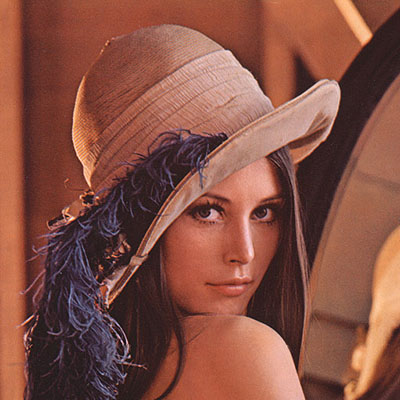
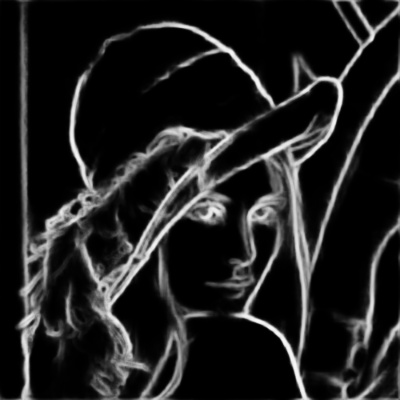
Holistically-Nested Edge Detection のディープラーニングモデルを考えてみよう。これは、現行バージョンの Caffeフレームワーク と比べて1点だけ違いのある状態で学習されている。2つの入力blobを受け取り、最初のblobを2番目のblobの空間次元に合わせてクロップする Crop レイヤーは、かつては中央からクロップしていた。現在のCaffeのレイヤーは左上隅からクロップする。そのため、最新版のCaffeまたはOpenCVを使うと、境界が埋められたずれた結果が得られる。
次に、左上クロップを行うOpenCVの Crop レイヤーを、中央クロップを行うものに置き換える。
getMemoryShapes メソッドと forward メソッドを持つクラスを作成する
class CropLayer(object):
def __init__(self, params, blobs):
self.xstart = 0
self.xend = 0
self.ystart = 0
self.yend = 0
def getMemoryShapes(self, inputs):
inputShape, targetShape = inputs[0], inputs[1]
batchSize, numChannels = inputShape[0], inputShape[1]
height, width = targetShape[2], targetShape[3]
self.ystart = (inputShape[2] - targetShape[2]) // 2
self.xstart = (inputShape[3] - targetShape[3]) // 2
self.yend = self.ystart + height
self.xend = self.xstart + width
return [[batchSize, numChannels, height, width]]
def forward(self, inputs):
return [inputs[0][:,:,self.ystart:self.yend,self.xstart:self.xend]]
- 覚え書き
- どちらのメソッドもリストを返す必要がある。
cv.dnn_registerLayer('Crop', CropLayer)
これで完了である。実装済みのOpenCVのレイヤーをカスタムのものに置き換えた。完全なスクリプトは ソースコード にある。

 1.12.0