前のチュートリアル: 輪郭 : はじめに
次のチュートリアル: 輪郭の特性
目標
この記事では、次のことを学ぶ
- 面積、周囲長、重心、バウンディングボックスなど、輪郭のさまざまな特徴を求める
- 輪郭に関連する多数の関数を見ていく。
1. モーメント
画像モーメントは、物体の重心や面積など、いくつかの特徴を計算するのに役立つ。画像モーメント に関するWikipediaのページを参照のこと。
関数 cv.moments() は、計算されたすべてのモーメント値の辞書を返す。以下を参照:
import numpy as np
import cv2 as cv
img =
cv.imread(
'star.jpg', cv.IMREAD_GRAYSCALE)
assert img is not None, "file could not be read, check with os.path.exists()"
cnt = contours[0]
print( M )
Mat imread(const String &filename, int flags=IMREAD_COLOR_BGR)
Loads an image from a file.
double threshold(InputArray src, OutputArray dst, double thresh, double maxval, int type)
Applies a fixed-level threshold to each array element.
Moments moments(InputArray array, bool binaryImage=false)
Calculates all of the moments up to the third order of a polygon or rasterized shape.
void findContours(InputArray image, OutputArrayOfArrays contours, OutputArray hierarchy, int mode, int method, Point offset=Point())
Finds contours in a binary image.
このモーメントから、面積や重心などの有用なデータを抽出できる。重心は次の関係式で与えられる: \(C_x = \frac{M_{10}}{M_{00}}\) および \(C_y = \frac{M_{01}}{M_{00}}\)。これは次のように行える:
cx = int(M['m10']/M['m00'])
cy = int(M['m01']/M['m00'])
2. 輪郭の面積
輪郭の面積は、関数 cv.contourArea() によって、またはモーメント M['m00'] から得られる。
double contourArea(InputArray contour, bool oriented=false)
Calculates a contour area.
3. 輪郭の周囲長
これは弧長とも呼ばれる。cv.arcLength() 関数を使って求められる。第2引数は、形状が閉じた輪郭か(Trueを渡した場合)、単なる曲線かを指定する。
double arcLength(InputArray curve, bool closed)
Calculates a contour perimeter or a curve length.
4. 輪郭の近似
指定した精度に応じて、輪郭の形状をより少ない頂点数の別の形状に近似する。これは Douglas-Peuckerアルゴリズム の実装である。アルゴリズムとデモについてはWikipediaのページを参照のこと。
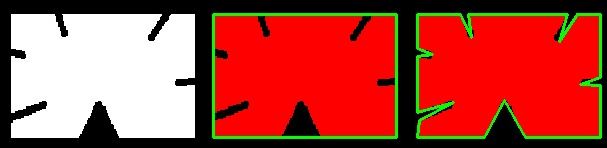
これを理解するために、画像の中で正方形を見つけようとしているが、画像に何らかの問題があって完全な正方形が得られず「悪い形状」になった(下の最初の画像に示すように)と仮定する。さて、この関数を使ってその形状を近似できる。ここで第2引数はepsilonと呼ばれ、輪郭から近似輪郭までの最大距離である。これは精度の引数である。正しい出力を得るには、epsilonの賢明な選択が必要である。
void approxPolyDP(InputArray curve, OutputArray approxCurve, double epsilon, bool closed)
Approximates a polygonal curve(s) with the specified precision.
下の2番目の画像では、緑の線が弧長の10%をepsilonとして近似した曲線を示している。3番目の画像は同じものを弧長の1%で示したものである。3番目の引数は曲線が閉じているかどうかを指定する。
image
5. 凸包 (Convex Hull)
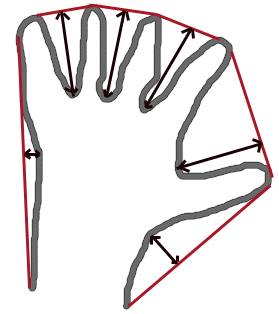
凸包は輪郭の近似に似て見えるが、実際には異なる(場合によっては両者が同じ結果を与えることもある)。ここでは、cv.convexHull() 関数が曲線の凸性の欠陥を調べて補正する。一般に、凸曲線とは常に外側に膨らんでいるか、少なくとも平坦な曲線のことである。そして内側に膨らんでいる場合、それは凸性の欠陥と呼ばれる。例として、下の手の画像を見てほしい。赤い線は手の凸包を示している。両矢印の印は凸性の欠陥を示しており、これは凸包から輪郭への局所的な最大の偏差である。
image
その構文について少し議論すべき点がある。
hull =
cv.convexHull(points[, hull[, clockwise[, returnPoints]]])
void convexHull(InputArray points, OutputArray hull, bool clockwise=false, bool returnPoints=true)
Finds the convex hull of a point set.
引数の詳細:
- points は入力として渡す輪郭である。
- hull は出力であり、通常は省略する。
- clockwise : 向きを指定するフラグ。Trueの場合、出力される凸包は時計回りの向きになる。そうでない場合は反時計回りの向きになる。
- returnPoints : デフォルトはTrue。この場合、凸包の点の座標を返す。Falseの場合、凸包の点に対応する輪郭点のインデックスを返す。
したがって、上の画像のような凸包を得るには、以下で十分である。
ただし、凸性の欠陥 (convexity defects) を求めたい場合は、returnPoints = False を渡す必要がある。これを理解するために、上の長方形の画像を使う。まずその輪郭を cnt として求めた。次に returnPoints = True で凸包を求めると、次の値が得られた:[[[234 202]], [[ 51 202]], [[ 51 79]], [[234 79]]]。これらは長方形の4つの角の点である。今度は returnPoints = False で同じことを行うと、次の結果が得られる:[[129],[ 67],[ 0],[142]]。これらは輪郭内の対応する点のインデックスである。例えば最初の値を確認すると、cnt[129] = [[234, 202]] となり、最初の結果と同じである(他も同様)。
これについては、凸性の欠陥を議論するときに再び見ることになる。
6. 凸性のチェック
曲線が凸かどうかをチェックする関数 cv.isContourConvex() がある。これは True か False を返すだけである。たいしたことはない。
bool isContourConvex(InputArray contour)
Tests a contour convexity.
7. 外接矩形 (Bounding Rectangle)
バウンディング矩形には2種類ある。
7.a. 軸並行の外接矩形 (Straight Bounding Rectangle)
これは軸並行の矩形であり、オブジェクトの回転を考慮しない。そのため外接矩形の面積は最小にはならない。これは関数 cv.boundingRect() で求められる。
(x,y) を矩形の左上の座標、(w,h) をその幅と高さとする。
void rectangle(InputOutputArray img, Point pt1, Point pt2, const Scalar &color, int thickness=1, int lineType=LINE_8, int shift=0)
Draws a simple, thick, or filled up-right rectangle.
Rect boundingRect(InputArray array)
Calculates the up-right bounding rectangle of a point set or non-zero pixels of gray-scale image.
7.b. 回転を考慮した矩形 (Rotated Rectangle)
ここでは、外接矩形は最小の面積で描かれるため、回転も考慮される。使用する関数は cv.minAreaRect() である。これは次の詳細を含む Box2D 構造体を返す - ( 中心 (x,y), (幅, 高さ), 回転角 )。ただしこの矩形を描くには、矩形の4つの角が必要である。それは関数 cv.boxPoints() で取得できる
box = np.int0(box)
void drawContours(InputOutputArray image, InputArrayOfArrays contours, int contourIdx, const Scalar &color, int thickness=1, int lineType=LINE_8, InputArray hierarchy=noArray(), int maxLevel=INT_MAX, Point offset=Point())
Draws contours outlines or filled contours.
RotatedRect minAreaRect(InputArray points)
Finds a rotated rectangle of the minimum area enclosing the input 2D point set.
void boxPoints(RotatedRect box, OutputArray points)
Finds the four vertices of a rotated rect. Useful to draw the rotated rectangle.
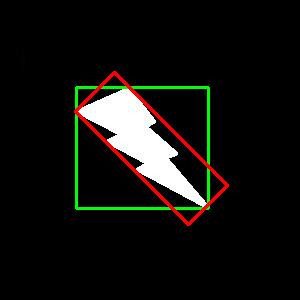
両方の矩形が1つの画像に表示されている。緑の矩形は通常の外接矩形を示す。赤の矩形は回転を考慮した矩形である。
image
8. 最小外接円
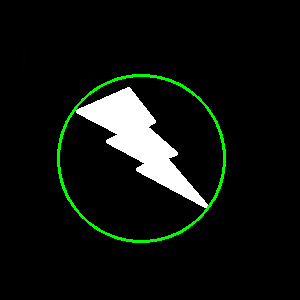
次に、関数 cv.minEnclosingCircle() を使って物体の外接円を求める。これは物体を完全に覆う最小面積の円である。
center = (int(x),int(y))
radius = int(radius)
void circle(InputOutputArray img, Point center, int radius, const Scalar &color, int thickness=1, int lineType=LINE_8, int shift=0)
Draws a circle.
void minEnclosingCircle(InputArray points, Point2f ¢er, float &radius)
Finds a circle of the minimum area enclosing a 2D point set.
9. 楕円のフィッティング
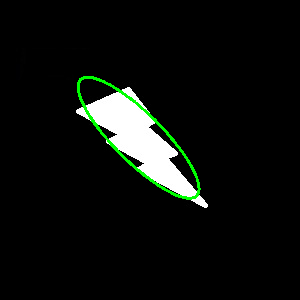
次は、オブジェクトに楕円をフィッティングすることである。これは楕円が内接する回転矩形を返す。
void ellipse(InputOutputArray img, Point center, Size axes, double angle, double startAngle, double endAngle, const Scalar &color, int thickness=1, int lineType=LINE_8, int shift=0)
Draws a simple or thick elliptic arc or fills an ellipse sector.
RotatedRect fitEllipse(InputArray points)
Fits an ellipse around a set of 2D points.
10. 直線のフィッティング
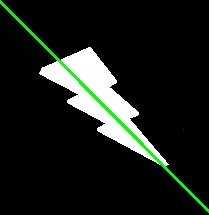
同様に、点の集合に直線をフィッティングできる。下の画像には白い点の集合が含まれている。これに対して直線を近似できる。
rows,cols = img.shape[:2]
[vx,vy,x,y] =
cv.fitLine(cnt, cv.DIST_L2,0,0.01,0.01)
lefty = int((-x*vy/vx) + y)
righty = int(((cols-x)*vy/vx)+y)
cv.line(img,(cols-1,righty),(0,lefty),(0,255,0),2)
void line(InputOutputArray img, Point pt1, Point pt2, const Scalar &color, int thickness=1, int lineType=LINE_8, int shift=0)
Draws a line segment connecting two points.
void fitLine(InputArray points, OutputArray line, int distType, double param, double reps, double aeps)
Fits a line to a 2D or 3D point set.

 1.12.0