目的
本章では、
- calib3dモジュールの特徴マッチングと findHomography を組み合わせ、複雑な画像の中から既知の物体を見つける。
基礎
前回のセッションで何をしたか思い出してみよう。queryImage を使い、そこからいくつかの特徴点を見つけ、別の trainImage を用意してその画像からも特徴を見つけ、それらの間の最良のマッチングを求めた。要するに、ある物体の一部が、別の雑然とした画像のどこにあるかを見つけた。この情報があれば、trainImage 上で物体を正確に見つけるのに十分である。
そのために、calib3dモジュールの関数、すなわち cv.findHomography() を使うことができる。両方の画像から得た点の集合を渡すと、そのオブジェクトの透視変換を求めてくれる。次に cv.perspectiveTransform() を使ってオブジェクトを探すことができる。変換を求めるには、少なくとも4つの正しい点が必要である。
マッチング時に、結果に影響を及ぼしうるいくつかの誤差が生じる可能性があることを見てきた。この問題を解決するため、アルゴリズムはRANSACまたはLEAST_MEDIAN (フラグで指定できる) を使用する。正しい推定を与える良いマッチをインライア、それ以外をアウトライアと呼ぶ。cv.findHomography() は、インライアとアウトライアの点を指定するマスクを返す。
では、やってみよう!
コード
まずいつも通り、画像からSIFT特徴を見つけ、比率テストを適用して最良のマッチを求めよう。
import numpy as np
import cv2 as cv
from matplotlib import pyplot as plt
MIN_MATCH_COUNT = 10
img1 =
cv.imread(
'box.png', cv.IMREAD_GRAYSCALE)
img2 =
cv.imread(
'box_in_scene.png', cv.IMREAD_GRAYSCALE)
sift = cv.SIFT_create()
kp1, des1 = sift.detectAndCompute(img1,None)
kp2, des2 = sift.detectAndCompute(img2,None)
FLANN_INDEX_KDTREE = 1
index_params = dict(algorithm = FLANN_INDEX_KDTREE, trees = 5)
search_params = dict(checks = 50)
matches = flann.knnMatch(des1,des2,k=2)
good = []
for m,n in matches:
if m.distance < 0.7*n.distance:
good.append(m)
Flann-based descriptor matcher.
Definition features.hpp:1260
Mat imread(const String &filename, int flags=IMREAD_COLOR_BGR)
Loads an image from a file.
次に、物体を見つけるには少なくとも10個のマッチ(MIN_MATCH_COUNT で定義)が必要だという条件を設定する。そうでなければ、マッチが十分でない旨のメッセージを表示するだけにする。
十分なマッチが見つかった場合、両方の画像でマッチしたキーポイントの位置を抽出する。それらを透視変換の計算に渡す。この3x3変換行列が得られたら、それを使って queryImage の四隅を trainImage 上の対応する点に変換する。そしてそれを描画する。
if len(good)>MIN_MATCH_COUNT:
src_pts = np.float32([ kp1[m.queryIdx].pt for m in good ]).reshape(-1,1,2)
dst_pts = np.float32([ kp2[m.trainIdx].pt for m in good ]).reshape(-1,1,2)
matchesMask = mask.ravel().tolist()
h,w = img1.shape
pts = np.float32([ [0,0],[0,h-1],[w-1,h-1],[w-1,0] ]).reshape(-1,1,2)
img2 =
cv.polylines(img2,[np.int32(dst)],
True,255,3, cv.LINE_AA)
else:
print( "Not enough matches are found - {}/{}".format(len(good), MIN_MATCH_COUNT) )
matchesMask = None
void perspectiveTransform(InputArray src, OutputArray dst, InputArray m)
Performs the perspective matrix transformation of vectors.
Mat findHomography(InputArray srcPoints, InputArray dstPoints, int method=0, double ransacReprojThreshold=3, OutputArray mask=noArray(), const int maxIters=2000, const double confidence=0.995)
Finds a perspective transformation between two planes.
void polylines(InputOutputArray img, InputArrayOfArrays pts, bool isClosed, const Scalar &color, int thickness=1, int lineType=LINE_8, int shift=0)
Draws several polygonal curves.
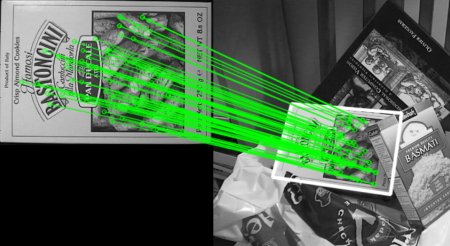
最後に、インライア(物体が正常に見つかった場合)またはマッチしたキーポイント(失敗した場合)を描画する。
draw_params = dict(matchColor = (0,255,0),
singlePointColor = None,
matchesMask = matchesMask,
flags = 2)
plt.imshow(img3, 'gray'),plt.show()
void drawMatches(InputArray img1, const std::vector< KeyPoint > &keypoints1, InputArray img2, const std::vector< KeyPoint > &keypoints2, const std::vector< DMatch > &matches1to2, InputOutputArray outImg, const Scalar &matchColor=Scalar::all(-1), const Scalar &singlePointColor=Scalar::all(-1), const std::vector< char > &matchesMask=std::vector< char >(), DrawMatchesFlags flags=DrawMatchesFlags::DEFAULT)
Draws the found matches of keypoints from two images.
下の結果を見てほしい。雑然とした画像の中で物体が白色で示されている。
image

 1.12.0