前のチュートリアル: 輪郭の特徴
次のチュートリアル: 輪郭 : さらに多くの関数
ここでは、Solidity(充実度)、Equivalent Diameter(等価直径)、Mask image(マスク画像)、Mean Intensity(平均輝度)など、物体のよく使われる性質をいくつか抽出する方法を学ぶ。さらに多くの特徴は Matlab regionprops ドキュメント で見つけることができる。
(注 : 重心、面積、周囲長なども同じカテゴリに属するが、前章で見たとおりである)
1. アスペクト比
物体のバウンディング矩形の幅と高さの比である。
\[Aspect \; Ratio = \frac{Width}{Height}\]
aspect_ratio = float(w)/h
Rect boundingRect(InputArray array)
Calculates the up-right bounding rectangle of a point set or non-zero pixels of gray-scale image.
2. Extent(占有率)
Extent は輪郭の面積とバウンディング矩形の面積の比である。
\[Extent = \frac{Object \; Area}{Bounding \; Rectangle \; Area}\]
rect_area = w*h
extent = float(area)/rect_area
double contourArea(InputArray contour, bool oriented=false)
Calculates a contour area.
3. Solidity(凸包占有率)
Solidity は輪郭の面積とその凸包の面積の比である。
\[Solidity = \frac{Contour \; Area}{Convex \; Hull \; Area}\]
solidity = float(area)/hull_area
void convexHull(InputArray points, OutputArray hull, bool clockwise=false, bool returnPoints=true)
Finds the convex hull of a point set.
4. 等価直径
Equivalent Diameter は、輪郭の面積と同じ面積を持つ円の直径である。
\[Equivalent \; Diameter = \sqrt{\frac{4 \times Contour \; Area}{\pi}}\]
equi_diameter = np.sqrt(4*area/np.pi)
5. 向き
Orientation は物体が向いている角度である。次のメソッドは主軸 (Major Axis) と副軸 (Minor Axis) の長さも返す。
RotatedRect fitEllipse(InputArray points)
Fits an ellipse around a set of 2D points.
6. マスクとピクセル点
場合によっては、その物体を構成するすべての点が必要になることがある。それは次のように行える:
mask = np.zeros(imgray.shape,np.uint8)
pixelpoints = np.transpose(np.nonzero(mask))
void drawContours(InputOutputArray image, InputArrayOfArrays contours, int contourIdx, const Scalar &color, int thickness=1, int lineType=LINE_8, InputArray hierarchy=noArray(), int maxLevel=INT_MAX, Point offset=Point())
Draws contours outlines or filled contours.
ここでは、同じことを行う2つの方法、1つは Numpy 関数を使う方法、もう1つは OpenCV 関数を使う方法(最後のコメントアウトされた行)が示されている。結果も同じだが、わずかな違いがある。Numpy は座標を (row, column) 形式で返すのに対し、OpenCV は座標を (x,y) 形式で返す。したがって基本的には答えが入れ替わる。row = y および column = x であることに注意。
7. 最大値・最小値とその位置
これらの引数はマスク画像を使って求めることができる。
min_val, max_val, min_loc, max_loc =
cv.minMaxLoc(imgray,mask = mask)
void minMaxLoc(InputArray src, double *minVal, double *maxVal=0, Point *minLoc=0, Point *maxLoc=0, InputArray mask=noArray())
Finds the global minimum and maximum in an array.
8. 平均色または平均輝度
ここでは、物体の平均色を求めることができる。あるいはグレースケールモードでの物体の平均輝度でもよい。これにも同じマスクを使う。
Scalar mean(InputArray src, InputArray mask=noArray())
Calculates an average (mean) of array elements.
9. 端点
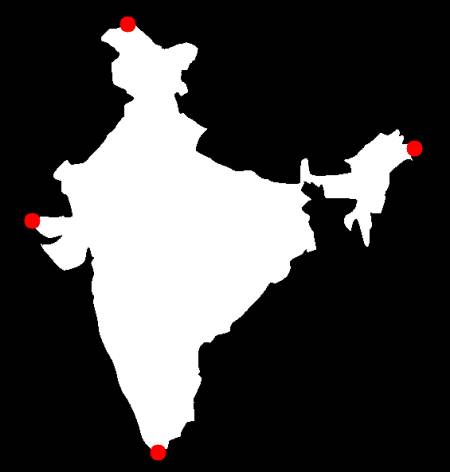
Extreme Points とは、物体の最上点、最下点、最右点、最左点を意味する。
leftmost = tuple(cnt[cnt[:,:,0].argmin()][0])
rightmost = tuple(cnt[cnt[:,:,0].argmax()][0])
topmost = tuple(cnt[cnt[:,:,1].argmin()][0])
bottommost = tuple(cnt[cnt[:,:,1].argmax()][0])
例えば、インドの地図に適用すると、次の結果が得られる :
image
演習
- matlab regionprops のドキュメントには、まだいくつかの特徴が残っている。それらを実装してみよう。

 1.12.0