目標
このチュートリアルでは次の内容を示す:
- 覚え書き
- 現在のところ、cv::Mat の読み書きのみをサポートしており、行列はメモリ上で連続している必要がある。他のデータ型のサポートはまだ実装されていない。
ソースコード
以下のコードは、シングルチャンネル行列と2チャンネル行列をデータセットに書き込み、それらを読み戻す方法を示している。
コードは こちら からダウンロードするか、opencv_contrib のソースコードライブラリの modules/hdf/samples/create_read_write_datasets.cpp ファイルから見つけることができる。
#include <iostream>
static void write_root_group_single_channel()
{
String filename =
"root_group_single_channel.h5";
String dataset_name =
"/single";
h5io->dswrite(data, dataset_name);
h5io->dsread(expected, dataset_name);
double diff =
norm(data - expected);
h5io->close();
}
static void write_single_channel()
{
String filename =
"single_channel.h5";
String dataset_name = parent_name +
"/single";
if (!h5io->hlexists(parent_name)) h5io->grcreate(parent_name);
if (!h5io->hlexists(dataset_name)) h5io->dscreate(data.
rows, data.
cols, data.
type(), dataset_name);
h5io->dswrite(data, dataset_name);
h5io->dsread(expected, dataset_name);
double diff =
norm(data - expected);
h5io->close();
}
static void write_multiple_channels()
{
String filename =
"two_channels.h5";
String dataset_name = parent_name +
"/two_channels";
((
int*) data.
data)[i] = (int)i;
if (!h5io->hlexists(parent_name)) h5io->grcreate(parent_name);
if (!h5io->hlexists(dataset_name)) h5io->dscreate(data.
rows, data.
cols, data.
type(), dataset_name);
h5io->dswrite(data, dataset_name);
h5io->dsread(expected, dataset_name);
double diff =
norm(data - expected);
h5io->close();
}
{
write_root_group_single_channel();
write_single_channel();
write_multiple_channels();
return 0;
}
#define CV_32SC2
Definition interface.h:102
解説
データセットを作成する最初のステップは、ファイルを開くことである
関数 write_root_group_single_channel() では、データセット名が /single であり、これはルートグループの内部にあるため、次のように記述できる
h5io->dswrite(data, dataset_name);
これにより、事前にデータセットを作成する必要なく、データを直接データセットに書き込むことができる。なぜなら、cv::hdf::HDF5::dswrite() の内部で自動的に作成されるからである。
- 警告
- これはルートグループの内部に存在するデータセットにのみ適用される。
もちろん、自分でデータセットを作成することもできる:
if (!h5io->hlexists(parent_name)) h5io->grcreate(parent_name);
if (!h5io->hlexists(dataset_name)) h5io->dscreate(data.
rows, data.
cols, data.
type(), dataset_name);
データセットからデータを読み込むには、次を使用する
h5io->dsread(expected, dataset_name);
データセットの名前を指定することによって。
次を使用することで、読み出したデータが以前に書き込んだデータと完全に一致することを確認できる
double diff =
norm(data - expected);
結果
図1は、ファイル root_group_single_channel についてツール HDFView を使用して可視化した結果を示している。ルートグループの直接の子ではないデータセットの行列の結果は、それぞれ図2と図3に示している。
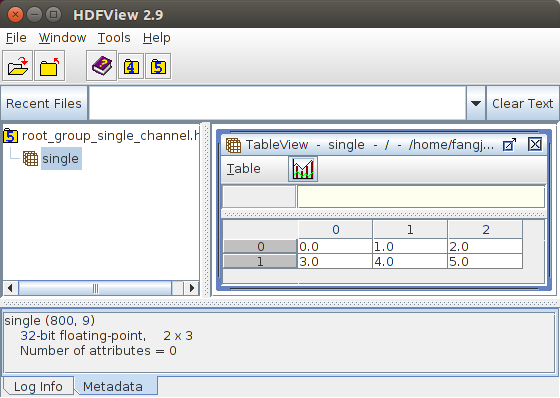
Figure 1: Result for writing a single channel matrix to a dataset inside the root group
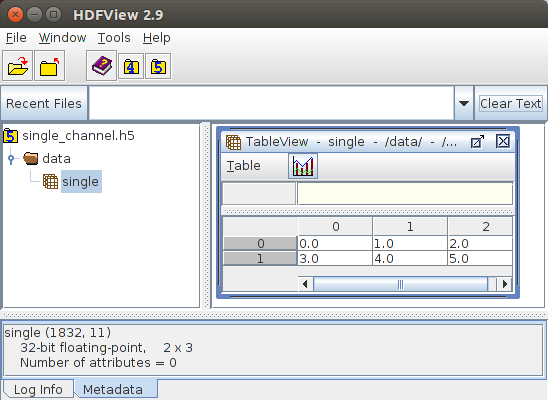
Figure 2: Result for writing a single channel matrix to a dataset not in the root group
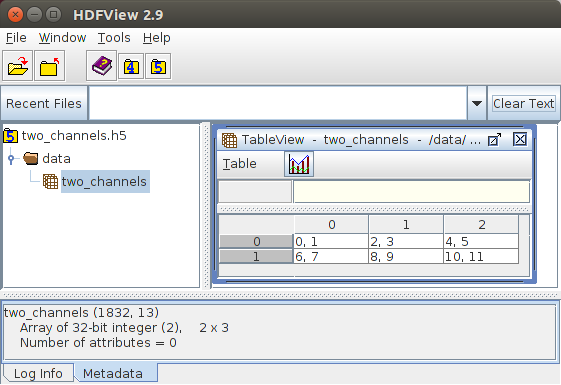
Figure 3: Result for writing a two-channel matrix to a dataset not in the root group

 1.12.0