目的
このチュートリアルでは次の内容を示す:
- 覚え書き
- 属性はグループやデータセットに関連付けることができるが、OpenCVではルートグループに対する属性のみが実装されている。サポートされている属性の型は
int, double, cv::String および cv::InputArray(連続配列の場合のみ)である。
ソースコード
以下のコードは、 cv::Mat 、 cv::String 、 int 、 double のデータ型を持つ属性を、ルートグループ内で読み書きする方法を示す。
コードは こちら からダウンロードできる。または opencv_contrib のソースコードライブラリ内のファイル modules/hdf/samples/read_write_attributes.cpp にある。
#include <iostream>
static void read_write_attributes()
{
String filename =
"attributes.h5";
String attr_mat_name =
"array attribute";
if (!h5io->atexists(attr_mat_name))
h5io->atwrite(attr_mat, attr_mat_name);
String attr_str_name =
"string attribute";
String attr_str =
"Hello HDF5 from OpenCV!";
if (!h5io->atexists(attr_str_name))
h5io->atwrite(attr_str, attr_str_name);
String attr_int_name =
"int attribute";
int attr_int = 123456;
if (!h5io->atexists(attr_int_name))
h5io->atwrite(attr_int, attr_int_name);
String attr_double_name =
"double attribute";
double attr_double = 45678.123;
if (!h5io->atexists(attr_double_name))
h5io->atwrite(attr_double, attr_double_name);
int expected_attr_int;
double expected_attr_double;
h5io->atread(&expected_attr_str, attr_str_name);
h5io->atread(expected_attr_mat, attr_mat_name);
h5io->atread(&expected_attr_int, attr_int_name);
h5io->atread(&expected_attr_double, attr_double_name);
CV_Assert(attr_str.compare(expected_attr_str) == 0);
CV_Assert(fabs(attr_double - expected_attr_double) < 1e-10);
h5io->close();
}
{
read_write_attributes();
return 0;
}
説明
最初のステップはHDF5ファイルを開くことである:
次に cv::hdf::HDF5::atwrite() を使い、値と名前を指定して属性を書き込む:
String attr_mat_name =
"array attribute";
if (!h5io->atexists(attr_mat_name))
h5io->atwrite(attr_mat, attr_mat_name);
- 警告
- 属性を書き込む前に、cv::hdf::HDF5::atexists() を使ってその属性が存在しないことを確認する必要がある。
属性を読み込むには、属性名を指定して cv::hdf::HDF5::atread() を使う
h5io->atread(expected_attr_mat, attr_mat_name);
最後に、HDFファイルを閉じる必要がある
結果
図1と図2は、ツールHDFViewを使って可視化した結果を示している。
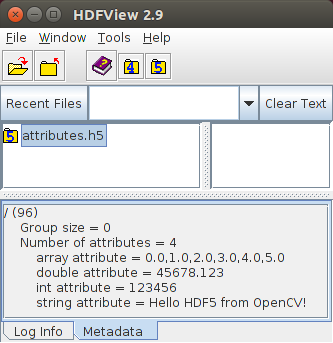
Figure 1: Attributes of the root group
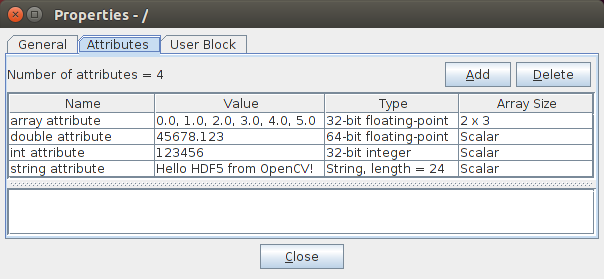
Figure 2: Detailed attribute information

 1.12.0